Secure Version of the Helper App
This version of the helper app is now obselete. As of version 2.0, the main release provides a togglable form of security. See the main page.
This version of the helper app allows you to deny permission to read or write a file when something requests to.
I released this version of the helper app for people using projects that they don't trust with the extension, and for people who are just paranoid. Make sure you read the "Drawbacks" section.
How to Use
First, follow the same steps for the regular version here.
Instead of just a plain window with text on it, the window should look like this:
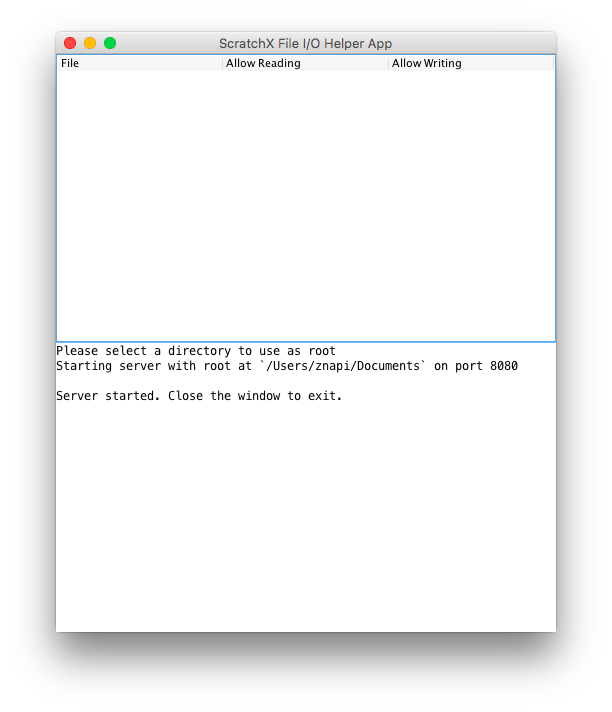
The empty white space in the top half is an emptly list of file permissions. You will be able to see and edit file permissions there. They won't appear until the project requests to read or write a file.
When a project tries to read or write a file for the first time, the helper app will pop up a dialog asking you for permission that looks like this:
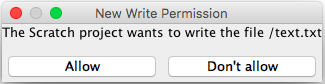
Click "allow" to grant the permission, and "don't allow" to deny the project that permission.
Once you have clicked "allow" or "don't allow", a new item in the file permission list will appear that looks like this:

You can click on the check boxes to change the permissions. Permissions that have not been asked for before cannot be changed, so if a checkbox is unchecked and clicking on it doesn't change it, it is because the project hasn't needed to perform that action on that file yet.
Play with it a little in ScratchX to get a better feel for how it works.
Drawbacks
This version of the helper app has some drawbacks can make it undesireable to use, and why it isn't the main release. I plan on making a more user-friendly version in the future.
Helper app window must always be visible
You can't maximize/fullscreen your browser window with ScratchX with this version of the helper app, because the helper app window needs to be visible at all times. Why? The dialogs it pops up asking for permission can't take the focus away from your browser window, so if you have the helper app hidden behind your browser, you won't see the dialogs pop up.
Projects can't accurately detect file permissions
A project can't accurately tell what the read/write permissions of a file are, which can cause problems if it needs to read or write a file.
File permissions must be set every time the helper app is restarted
Setting the same permissions each time you use a project would probably get annoying. There is no way to load a set of permissions into it on startup.
No console mode
For most users this will not matter, but this version does not have a working console mode.